---
title: Enabling Location Services for e-Bridge
description: Instructions on enabling location services for e-Bridge on IOS and Android devices.
---
[Skip to content](https://connect.general-devices.com/knowledge-base/enabling-location-services-for-e-bridge-android-ios#main-content)
[](https://general-devices.com/)
- [About GD](https://general-devices.com/about-us/)
Show submenu for About GD
- [GD Solution Suite](https://general-devices.com/gd-solution-suite/)
- [Find Your Regional Manager](https://general-devices.com/find-your-rep/)
- [Who We Serve](https://general-devices.com/who-we-serve/)
Show submenu for Who We Serve
- [Hospitals](https://general-devices.com/hospitals/)
- [EMS](https://general-devices.com/ems/)
- [Healthcare Network](https://general-devices.com/healthcare-network/)
- [Customer Support](https://general-devices.com/customer-support/)
Show submenu for Customer Support
- [Technical Support](https://general-devices.com/technical-support/)
- [Customer Success](https://general-devices.com/customer-success/)
- [News & Resources](https://general-devices.com/resources/)
Show submenu for News & Resources
- [Blogs](https://general-devices.com/blogs/)
- [Press Releases](https://general-devices.com/press-releases/)
- [Customer Stories](https://general-devices.com/customer-stories/)
Open main navigation
Close main navigation
- [About GD](https://general-devices.com/about-us/)
Show submenu for About GD
- [GD Solution Suite](https://general-devices.com/gd-solution-suite/)
- [Find Your Regional Manager](https://general-devices.com/find-your-rep/)
- [Who We Serve](https://general-devices.com/who-we-serve/)
Show submenu for Who We Serve
- [Hospitals](https://general-devices.com/hospitals/)
- [EMS](https://general-devices.com/ems/)
- [Healthcare Network](https://general-devices.com/healthcare-network/)
- [Customer Support](https://general-devices.com/customer-support/)
Show submenu for Customer Support
- [Technical Support](https://general-devices.com/technical-support/)
- [Customer Success](https://general-devices.com/customer-success/)
- [News & Resources](https://general-devices.com/resources/)
Show submenu for News & Resources
- [Blogs](https://general-devices.com/blogs/)
- [Press Releases](https://general-devices.com/press-releases/)
- [Customer Stories](https://general-devices.com/customer-stories/)
- [Schedule A Demo](https://general-devices.com/schedule-a-demo/)
[Schedule A Demo](https://general-devices.com/schedule-a-demo/)
How can we help you?
- There are no suggestions because the search field is empty.
1. [Knowledge Base](https://connect.general-devices.com/knowledge-base?hsLang=en)
2. [e-Bridge](https://connect.general-devices.com/knowledge-base/e-bridge?hsLang=en)
# Enabling Location Services for e-Bridge
## To ensure GPS functionality works correctly in the e-Bridge mobile app (e.g., sending live ETA updates, using the Tracking feature), Location Services must be properly enabled with precise access on your device.
#### **Android Instructions**
Path: Settings \> Apps \> e-Bridge \> Permissions \> Location
Steps:
- Open Settings on your Android device.
- Navigate to Apps and select e-Bridge.
- Tap Permissions, then select Location.
- Choose Allow all the time to ensure background GPS tracking functions properly.
- Ensure Use precise location is toggled ON (enabled).
Screenshot Example:
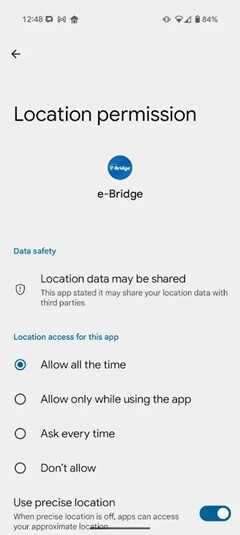
Note: Choosing 'Allow all the time' is critical for continuous tracking while the app is running in the background or when the screen is off.
#### **iOS Instructions**
Path: Settings \> e-Bridge \> Location
Steps:
- Open the Settings app on your iPhone.
- Scroll down and select e-Bridge.
- Tap Location.
- Choose Always to allow background location tracking.
- Enable the toggle for Precise Location.
Screenshot Example:
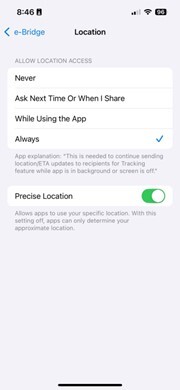
Note: Without selecting 'Always', ETA and Tracking features may not update accurately when the app is minimized.
#### **Why This Matters**
To enable reliable use of features like:
- Real-time location tracking
- ETA updates to receiving facilities
- Background GPS data capture
…it’s essential these settings are configured properly. Users without these settings may experience delays or failures in GPS-based functionality.
#### **PC (Windows) Instructions - Location Services & GPS Support**
The e-Bridge app can also be used on Windows PCs, including EMS laptops like Panasonic Toughbooks. However, not all PCs come with built-in GPS hardware. To ensure accurate GPS tracking and ETA features, the following conditions and settings must be met.
#### **Does Your PC Have GPS?**
Most Windows laptops do not include built-in GPS. Instead, they rely on one of the following methods for location:
- External GPS modules (USB, serial, or Bluetooth)
- Cellular modems with GNSS capabilities
- Wi-Fi-based location approximation
- Software emulation (e.g., IP-based location)
For EMS field use, accurate GPS typically requires an external GPS receiver or a cellular modem with GNSS. Wi-Fi or IP-based location services may be too imprecise for real-time tracking features.
#### **Required Windows Settings**
Path: Settings \> Privacy & Security \> Location
Steps:
- Open the Settings app on your PC
- Go to Privacy & Security \> Location
- Ensure Location Services is toggled ON
- Scroll down and allow apps (or your web browser) to access location
- Ensure e-Bridge (or your web browser, if using the web version) has permission to use location
#### **Testing GPS Functionality**
To verify location functionality on a PC, use the built-in Maps app or visit a site like https://mylocation.org in a browser. If your devices reports an accurate location, GPS is likely working.
#### **EMS Deployment Recommendations**
For best results with e-Bridge on EMS laptops:
- Use devices with built-in GPS or cellular modems (with GNSS)
- Consider adding USB-based GPS receivers if built-in options are not available
- Confirm that GPS drivers are properly installed
- Ensure Windows Location Services are enabled and accessible by e-Bridge
If you need further assistance, reach out to your e-Bridge support contact.
- [e-Bridge](https://connect.general-devices.com/knowledge-base/e-bridge?hsLang=en)
- [CAREpoint 3](https://connect.general-devices.com/knowledge-base/carepoint-3?hsLang=en)
- [D-Scribe X](https://connect.general-devices.com/knowledge-base/d-scribe-x?hsLang=en)
- [CAREpoint 2](https://connect.general-devices.com/knowledge-base/carepoint-2?hsLang=en)
- [Product Updates](https://connect.general-devices.com/knowledge-base/product-updates?hsLang=en)
- About GD
- [GD Solution Suite](https://general-devices.com/gd-solution-suite/)
- [Find Your Regional Managers](https://general-devices.com/find-your-rep/)
- Who We Serve
- [Hospitals](https://general-devices.com/hospitals/)
- [EMS](https://general-devices.com/ems/)
- [Healthcare Network](https://general-devices.com/healthcare-network/)
- Customer Support
- [Technical Support](https://general-devices.com/technical-support/)
- [Customer Success](https://general-devices.com/customer-success/)
- News & Resources
- [Press Releases](https://general-devices.com/press-releases/)
- [Blogs](https://general-devices.com/blogs/)
- [Customer Stories](https://general-devices.com/customer-stories/)
- Contact Us
- [Email Us](mailto:innovation@general-devices.com)
- [Schedule a Demo](https://general-devices.com/schedule-a-demo/)
- [201-313-7075](tel:+12013137075)
- [Privacy Policy](https://general-devices.com/privacy-policy/)
[](https://general-devices.com/)
© 2026 General Devices, Inc. All rights reserved.