
Managing e-Bridge Alerts with a Pixel Watch:
When a Google Pixel Watch is paired to your Android phone, the watch takes over as your primary notification device. This is normal Pixel Watch behavior and is designed so you aren't alerted twice for the same notification. However, it means e-Bridge alerts are handled by the watch instead of the phone, and the phone stays silent. Because of this, the watch can only play its own standard notification sound, not the loud e-Bridge alert tone.
Why This Happens:
The Pixel Watch app has a setting called 'Mute notifications on phone' under the Manage phone notifications section. When it is on, notifications will not vibrate or ring your phone while you are wearing your watch. This switch is on by default, because most people only want one device to alert them.
Because e-Bridge is then being routed through the Pixel Watch, the sound the watch plays cannot be controlled by e-Bridge. The watch simply uses the default notification sound it makes for any app. The loud, dedicated e-Bridge alert tone can only come out of the phone.
How to Fix This for e-Bridge:
To make sure your phone plays the full e-Bridge alert tone while you are wearing your Pixel Watch, you can turn off e-Bridge notifications on the watch. This forces your phone to handle e-Bridge notifications directly, bypassing the watch. It applies to e-Bridge only, so every other app on your watch keeps working the way it does today.
Steps to Turn Off e-Bridge Notifications on the Watch:
- On your phone, open the Pixel Watch app
- Tap Notifications
- Tap App notifications
- Find e-Bridge in the list and toggle the switch to the OFF position (the switch will turn from blue to gray)
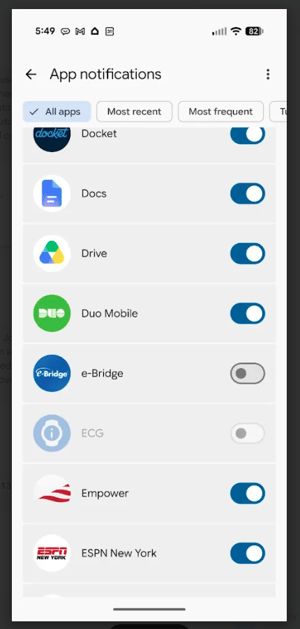
Result:
After turning off e-Bridge notifications on your watch, e-Bridge alerts will go to your phone even while your Pixel Watch is paired and being worn, ensuring you hear the full e-Bridge alert tone for urgent notifications.
Optional: Alerting on Both Your Phone and Your Watch
If you would rather be alerted on both devices, turn off the 'Mute notifications on phone' switch and leave e-Bridge notifications on your watch enabled. Keep in mind that this is a device-wide setting. It applies to every app on your watch, not just e-Bridge, and the watch will still only play its default notification sound.
- On your phone, open the Pixel Watch app
- Tap Notifications
- Scroll down to the Manage phone notifications section
- Turn off the switch labeled 'Mute notifications on phone'
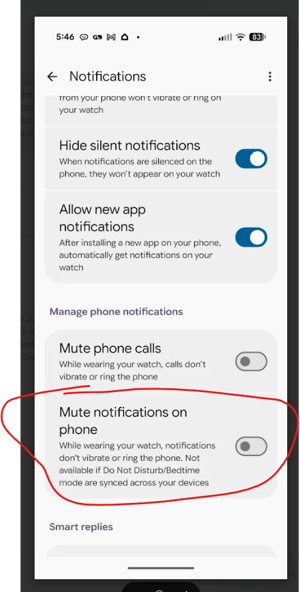
Note: 'Mute notifications on phone' is not available if Do Not Disturb or Bedtime mode are synced across your devices.